User:Smoth: Difference between revisions
No edit summary |
No edit summary |
||
| Line 1: | Line 1: | ||
Plans for game developer restructure:<br/>3 sections, beginer, intermediate and advanced.<br/><br/>Beginner:(1 star) | |||
#focus on how does I get my game in spring | |||
#how can I alter what is already there | |||
#stay within knorkes beginner game, we want to have the user in a sort of sandbox. | |||
#think mutator | |||
Intermediate:(2 stars) | |||
#focus on creating your own content and using it in game | |||
#introduce them into existing resources lua/models/art | |||
#most tutorials will be located here. | |||
#think mod | |||
Advanced:(3 stars) | |||
#person is experience programmer or familiar with spring already. | |||
#no tutorials, just informational links, this person wants information not how tos. | |||
SmothSmoth is Smmmmmmmmmmoooootttthhhhh!! | |||
'''Notes for SimpleParticleSystem:''' | |||
''' | |||
*[[Testpageforforb|a label]] | |||
< | *'''float3 pos'''<br/>Origon point for your particle system.<br/> | ||
''' | *'''[[AtlasedTexture]] texture'''<br/>Texture for the particles, defined in resources.tdf.<br/> | ||
*'''float3 emitVector'''<br/>Use DIR to have it acquire a direction, this will utilize a poly on your object that you choose as an emitter.<br/><br/>See my notes on vectors to understand how to use the vectors of this:<br/>''i.e. 0,1,0 is straight up''<br/> | |||
</ | *'''[[CColorMap]] colorMap'''<br/>This will give your system a range of colors spread over time.<br/>it has 4 parts:<br/>RED, GREEN, BLUE, ALPHA<br/><br/>note:<br/>For additive blend use values that are low like: 0.1 or 0.05<br/>For overlay use 1.0<br/>see notes on overlay versus additive blend.<br/> | ||
*'''float3 gravity'''<br/>Gravity applied along a vector.<br/><br/>For example, if you want your particles to fall after being emmited.<br/>Emitvector would be: 0,1,0<br/>and gravity would need to be 0,-1,0<br/>This would result in particles falling straight down.<br/> | |||
< | *'''float airdrag'''<br/>Constant multiplier on the particle each frame, a value of 1.0 means the particles will keep their current momentum, a value bellow 1 and they will slow down each frame.<br/> | ||
'''float | *'''float particleLife'''<br/>Life of the particles in frames.<br/> | ||
Random number between 0 and | *'''float particleLifeSpread'''<br/>Random number between 0 and particleLifeSpread added to particleLife.<br/> | ||
</ | *'''int numParticles'''<br/>Number of particles that will be spawned.<br/> | ||
*'''float particleSpeed'''<br/>Initial speed of the particles.<br/> | |||
< | *'''float particleSpeedSpread'''<br/>Random number between 0 and particleSpeedSpread added to particleSpeed.<br/> | ||
'''float | *'''float particleSize'''<br/>Size of the particles.<br/> | ||
*'''float particleSizeSpread'''<br/>Random number between 0 and particleSizeSpread added to particleSize.<br/> | |||
</ | *'''float sizeGrowth'''<br/>Size added to particles each frame.<br/> | ||
*'''float sizeMod'''<br/>Size frame multiplier.<br/> | |||
< | *'''float emitRot'''<br/>Rotation in degree from emitVector that particles will be spawned from, a value of 90 will emmit particles in a plane perpendicular to the emitVector.<br/> | ||
'''float particleSizeSpread'''<br> | *'''float emitRotSpread'''<br/>Random number between 0 and emitRotSpread added to emitRot, a value of 180 will make the particles spawn in a full sphere.<br/> | ||
Random number between 0 and particleSizeSpread added to particleSize. | *'''bool directional'''<br/>If the particles should be oriented to point at the direction of their velocity.<br/> | ||
</ | |||
'''float sizeGrowth'''<br> | |||
Size added to particles each frame. | |||
</ | |||
'''float sizeMod'''<br> | |||
Size frame multiplier. | |||
</ | |||
'''float emitRot'''<br> | |||
Rotation in degree from emitVector that particles will be spawned from, a value of 90 will emmit particles in a plane perpendicular to the emitVector. | |||
</ | |||
'''float emitRotSpread'''<br> | |||
Random number between 0 and emitRotSpread added to emitRot, a value of 180 will make the particles spawn in a full sphere. | |||
</ | |||
'''bool directional'''<br> | |||
If the particles should be oriented to point at the direction of their velocity. | |||
'''Notes vectors:''' | '''Notes vectors:''' | ||
*Vectors are directional systems represented by a 3d graph here: [[File:Untitled-1.png]]<br/>See how each vector points along it's own line?<br/>We have 6 possible directions:<br/><center> | |||
X = right<br/>-X = left<br/>Z = Front<br/>-Z = Rear<br/>Y = Up<br/>-Y = Down | |||
Vectors are | |||
[[ | |||
See how each vector points along it's own line? | |||
<br> | |||
We have 6 possible directions:<br> | |||
<center> | |||
X = right<br> | |||
-X = left<br> | |||
Z = Front<br> | |||
-Z = Rear<br> | |||
Y = Up<br> | |||
-Y = Down | |||
</center> | </center> | ||
WORK IN PROGRESS! | WORK IN PROGRESS! | ||
<br/> | |||
<br/>'''Notes Additive blend versus overlay blend:''' | |||
WORK IN PROGRESS!<br/> | |||
*ADDTITIVE<br/> | |||
*OVERLAY<br/> | |||
IsShield=1; // if 1 mean the weapon is a shield and not a weapon | <br/>IsShield=1; // if 1 mean the weapon is a shield and not a weapon shieldrepulser=1; // 0=destroy projectile,1=repulse (bounce) projectile smartshield=1; // 1=shield doesnt affect allies weapons exteriorshield=1; // 1=shield doesnt affect weapons fired from within shield visibleshield=1; // 1=see a visible shell representing the shield visibleshieldrepulse=1; // 1=see a beam showing when shield repulses something shieldenergyuse=10; // how much energy the shield use when repulsing/destroying something shieldforce=1000; // how hard shield can accelerate some sort of projectiles away shieldradius=30; // size of shield effect shieldmaxspeed=1100; // maximum speed the shield can push some sort of projectiles away shieldpower=300; // how much power the shield can store, power is drained by the affected weapons damage, 0=infinite shieldpowerregen=5; // how fast the shield regenerates power shieldpowerregenenergy=10; // how much energy the shield uses when regenerating power shieldintercepttype=2; // which types of weapon the shield can affect (bitfield) //interceptedbyshieldtype=; // which types of shields can affect this weapon, if (shieldInterceptType & interceptedByShieldType) is not zero the shield can affect the weapon, default 1 for plasma, 2 for laser, 4 for missiles, 0 for other shieldgoodcolor=0.0 0.05 0.75; // color of shield when power is full shieldbadcolor=0.6 0.05 0.75; // color of shield when power is empty shieldalpha=1; // how visible the shield shell is with visibleshield=1 | ||
shieldrepulser=1; // 0=destroy projectile,1=repulse (bounce) projectile | |||
smartshield=1; // 1=shield doesnt affect allies weapons | |||
exteriorshield=1; // 1=shield doesnt affect weapons fired from within shield | |||
visibleshield=1; // 1=see a visible shell representing the shield | |||
visibleshieldrepulse=1; // 1=see a beam showing when shield repulses something | |||
shieldenergyuse=10; // how much energy the shield use when repulsing/destroying something | |||
shieldforce=1000; // how hard shield can accelerate some sort of projectiles away | |||
shieldradius=30; // size of shield effect | |||
shieldmaxspeed=1100; // maximum speed the shield can push some sort of projectiles away | |||
shieldpower=300; // how much power the shield can store, power is drained by the affected weapons damage, 0=infinite | |||
shieldpowerregen=5; // how fast the shield regenerates power | |||
shieldpowerregenenergy=10; // how much energy the shield uses when regenerating power | |||
shieldintercepttype=2; // which types of weapon the shield can affect (bitfield) | |||
//interceptedbyshieldtype=; // which types of shields can affect this weapon, if (shieldInterceptType & interceptedByShieldType) is not zero the shield can affect the weapon, default 1 for plasma, 2 for laser, 4 for missiles, 0 for other | |||
shieldgoodcolor=0.0 0.05 0.75; // color of shield when power is full | |||
shieldbadcolor=0.6 0.05 0.75; // color of shield when power is empty | |||
shieldalpha=1; // how visible the shield shell is with visibleshield=1 | |||
Revision as of 16:21, 10 April 2012
Plans for game developer restructure:
3 sections, beginer, intermediate and advanced.
Beginner:(1 star)
- focus on how does I get my game in spring
- how can I alter what is already there
- stay within knorkes beginner game, we want to have the user in a sort of sandbox.
- think mutator
Intermediate:(2 stars)
- focus on creating your own content and using it in game
- introduce them into existing resources lua/models/art
- most tutorials will be located here.
- think mod
Advanced:(3 stars)
- person is experience programmer or familiar with spring already.
- no tutorials, just informational links, this person wants information not how tos.
SmothSmoth is Smmmmmmmmmmoooootttthhhhh!!
Notes for SimpleParticleSystem:
- float3 pos
Origon point for your particle system. - AtlasedTexture texture
Texture for the particles, defined in resources.tdf. - float3 emitVector
Use DIR to have it acquire a direction, this will utilize a poly on your object that you choose as an emitter.
See my notes on vectors to understand how to use the vectors of this:
i.e. 0,1,0 is straight up - CColorMap colorMap
This will give your system a range of colors spread over time.
it has 4 parts:
RED, GREEN, BLUE, ALPHA
note:
For additive blend use values that are low like: 0.1 or 0.05
For overlay use 1.0
see notes on overlay versus additive blend. - float3 gravity
Gravity applied along a vector.
For example, if you want your particles to fall after being emmited.
Emitvector would be: 0,1,0
and gravity would need to be 0,-1,0
This would result in particles falling straight down. - float airdrag
Constant multiplier on the particle each frame, a value of 1.0 means the particles will keep their current momentum, a value bellow 1 and they will slow down each frame. - float particleLife
Life of the particles in frames. - float particleLifeSpread
Random number between 0 and particleLifeSpread added to particleLife. - int numParticles
Number of particles that will be spawned. - float particleSpeed
Initial speed of the particles. - float particleSpeedSpread
Random number between 0 and particleSpeedSpread added to particleSpeed. - float particleSize
Size of the particles. - float particleSizeSpread
Random number between 0 and particleSizeSpread added to particleSize. - float sizeGrowth
Size added to particles each frame. - float sizeMod
Size frame multiplier. - float emitRot
Rotation in degree from emitVector that particles will be spawned from, a value of 90 will emmit particles in a plane perpendicular to the emitVector. - float emitRotSpread
Random number between 0 and emitRotSpread added to emitRot, a value of 180 will make the particles spawn in a full sphere. - bool directional
If the particles should be oriented to point at the direction of their velocity.
Notes vectors:
- Vectors are directional systems represented by a 3d graph here:
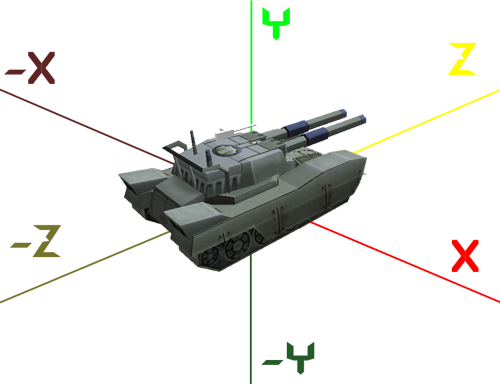
See how each vector points along it's own line?
We have 6 possible directions:

X = right
-X = left
Z = Front
-Z = Rear
Y = Up
-Y = Down
WORK IN PROGRESS!
Notes Additive blend versus overlay blend:
WORK IN PROGRESS!
- ADDTITIVE
- OVERLAY
IsShield=1; // if 1 mean the weapon is a shield and not a weapon shieldrepulser=1; // 0=destroy projectile,1=repulse (bounce) projectile smartshield=1; // 1=shield doesnt affect allies weapons exteriorshield=1; // 1=shield doesnt affect weapons fired from within shield visibleshield=1; // 1=see a visible shell representing the shield visibleshieldrepulse=1; // 1=see a beam showing when shield repulses something shieldenergyuse=10; // how much energy the shield use when repulsing/destroying something shieldforce=1000; // how hard shield can accelerate some sort of projectiles away shieldradius=30; // size of shield effect shieldmaxspeed=1100; // maximum speed the shield can push some sort of projectiles away shieldpower=300; // how much power the shield can store, power is drained by the affected weapons damage, 0=infinite shieldpowerregen=5; // how fast the shield regenerates power shieldpowerregenenergy=10; // how much energy the shield uses when regenerating power shieldintercepttype=2; // which types of weapon the shield can affect (bitfield) //interceptedbyshieldtype=; // which types of shields can affect this weapon, if (shieldInterceptType & interceptedByShieldType) is not zero the shield can affect the weapon, default 1 for plasma, 2 for laser, 4 for missiles, 0 for other shieldgoodcolor=0.0 0.05 0.75; // color of shield when power is full shieldbadcolor=0.6 0.05 0.75; // color of shield when power is empty shieldalpha=1; // how visible the shield shell is with visibleshield=1
